Get stuff finished in a distracted world.

One goal on your Mac. A reminder when you drift.

Finishd runs on your Mac. Email yourself the link.Free to try. Pay once.

Works seamlessly on Safari, Chrome, Arc, Firefox and Zen.

How it works

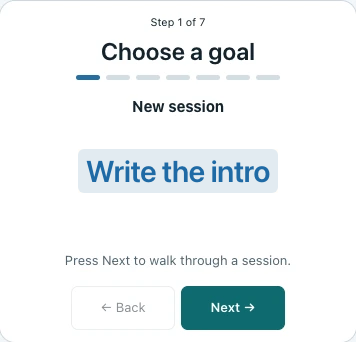
Choose a goal, duration, apps and sites in the setup sentence

Summary of your focused day

Select a session to see its activity

Work, School, Anywhere!

Finishd was made for everyone, to help people get their work done in a distracted world. Tailored to students and adults who struggle with ADHD.

Twig Wren reading an open book
Read that
science paper
Twig Wren in glasses writing on a flat clipboard
Finish your
research essay
Twig Wren holding a wrench
Book that
car repair

Pricing

Pro

  • Unlimited sessions
  • Pro features: Nudge and Block
  • Full log
  • Session trace: where your time went
  • Custom presets
  • Up to 3 Macs

$19.99 once

Go Pro

Pro+

Coming soon!
  • Everything in Pro
  • Finishd for iPhone, in sync with your Mac sessions
  • More on the way

Monthly price to be announced

*Only supported on Mac right now.


What’s coming next?


FAQs

What do I need?

A Mac with macOS 13 or later. Tab reading works with Safari, Chrome, Arc, Firefox and Zen.

How do Nudge and Block work?

Choose a mode for each session.

Nudge

The card shows your goal and the three choices. Nothing is hidden. Every choice is noted in the log.

Free.

Block

The card appears with a 5-second countdown, which you can set from 0 to 60. When it ends, the app outside your list is hidden and the last app on your list comes back to the front. Your list is locked for the session, so the card has no This is part of it.

Paid, and included in your first 10 sessions.

What stays on my Mac?
  • No account. No login of any kind.
  • No analytics, no telemetry, and no crash reports sent anywhere.
  • Your log stays on your Mac. It stores app names and site names, such as instagram.com. It never stores full web addresses, window titles or page content.
  • With Pro, the log can also keep how long each app and site was in front during a session. You can turn that off in Settings.
  • The app connects to the internet for two things only: activating a license key and checking for updates.
  • It does not take screenshots or record your screen.
  • This website sets no cookies, runs no tracking scripts, and loads nothing from other sites.

Details are in the Privacy Policy.

Which permissions does it ask for?

Automation, once per browser, lets Finishd read the site name in the front tab.

What happens after the first 10 sessions?

The app moves to the free tier and keeps working. If you choose Block or start a third session in a day, it shows the option to buy.

Is there an iPhone app?

Not yet. Finishd for iPhone is planned as part of Pro+, a monthly plan that is coming soon. The Mac app is a one-time purchase and stays that way.

Can I get a refund?

See the Refund Policy.


Get stuff Finished.

Download for MacEmail Mac Link